At a Glance
Best For
Overview
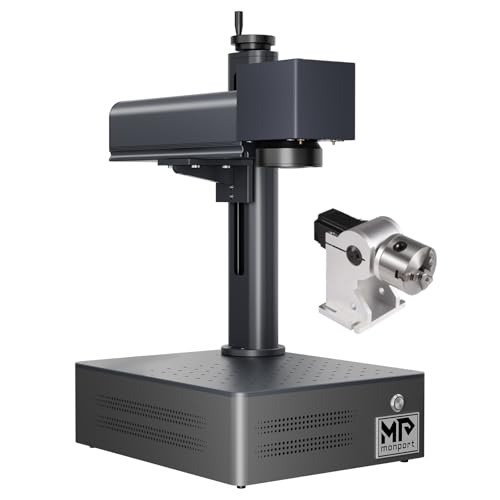
The Monport 60W JPT MOPA Fiber Laser is the answer to a narrow question: what is the cheapest 60W MOPA machine on the market that ships with a confirmed 175×175mm work area?
For anyone else, the savings are an illusion. The Monport 60W MOPA has only 16 Amazon ratings as of mid-2026 — too thin to reveal factory QC patterns, too thin to verify cross-unit consistency, and too thin to surface the kind of edge-case hardware failures that show up after sustained use. Compare to the ComMarker B4 60W MOPA, which has hundreds of owner reports, documented LightBurn forum threads, an established community settings library, and a track record of consistent owner success.
The MOPA hardware itself is genuine. JPT is the same top-tier Chinese laser source manufacturer that supplies OMTech and ComMarker MOPA lines, the 1–4,000kHz frequency range and 2–500ns pulse-width envelope are the full MOPA parameter spec, and the 60W output handles deep engraving on hardened steel and color marking on stainless and titanium at speeds that 30W MOPAs cannot match. The reason the Monport gets excluded from most '60W MOPA recommendations' threads on Reddit (where OMG Laser and Haotian dominate) is not because the hardware is bad — it's because the supporting infrastructure (community parameter libraries, owner verification, established support patterns) does not exist for the Monport at this wattage tier. The capability is real; the path to using it confidently is unsupported.
Pros & Cons
Pros
- The current title identifies a 60W JPT MOPA configuration, 6.9-inch square field, and rotary axis; confirm the exact bundle with the seller
- 175×175mm work area confirmed on the Amazon listing — accommodates full-size tumblers with a rotary chuck without lens swaps
- LightBurn galvo support confirmed via BSLcad controller — Amazon listing explicitly states 'All Monport fiber marking machines can be operated using Lightburn'
- 1–4,000kHz frequency range and 2–500ns pulse width provide the full MOPA parameter envelope for stainless steel color marking and titanium anodization
- 60W output is meaningfully faster than 30W for deep engraving — depth-map coin engraving documented by a Reddit owner using LightBurn 3D slice at production-viable speeds
Cons
- Only 16 Amazon ratings — too thin to verify factory QC or catch edge-case failures; at this wattage, a single DOA unit would represent 6% of all reviews
- No community material libraries for BSLcad exist anywhere — owners building color marking settings start from zero; the LightBurn parameter libraries that circulate for OMG Laser and ComMarker do not transfer
- In buyer comparison threads for 60W MOPA, Monport was explicitly excluded from recommendations due to 'unclear specs, lack of real user feedback' — OMG Laser and Haotian dominate those conversations
- MOPA settings complexity is brand-documented as brutal for newcomers — one Reddit owner described the transition from CO2 as 'feeling like I've never used technology before' with their Monport MOPA
- 60W is a Class 4 open-beam laser — no enclosure, invisible 1064nm infrared beam, requires OD5+ eyewear and a dedicated controlled workspace; not a beginner purchase at any price
Build Quality & Design
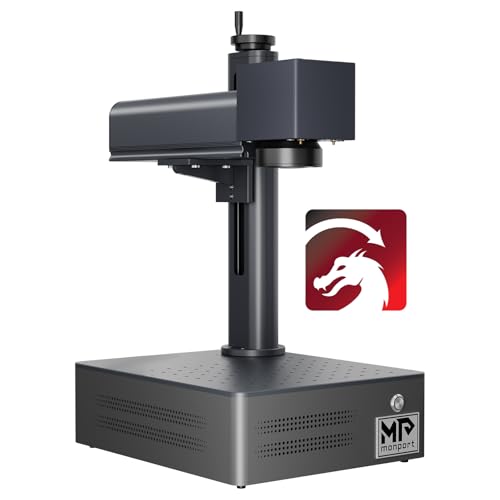
The Monport 60W MOPA is built around a 5 kg chassis — heavier than its 20W and 30W siblings, reflecting the larger 60W MOPA source assembly and beefier galvo system inside. The split/portable form factor remains: the laser head detaches from the column, the control box sits separately, and the machine fits on a standard workbench without dedicated infrastructure. For a 60W machine, this portability is unusual — most 60W fiber lasers are built around fixed industrial-tier chassis. The Monport's portable form factor at 60W is genuinely uncommon at the price.
The 175×175mm work area is the headline configuration spec, and the Amazon listing explicitly confirms it. This is a meaningfully larger field than the 110×110mm work area on the cheaper Monport 30W MOPA, and it's the key configuration that makes the 60W MOPA usable for tumblers (full 20–30 oz tumblers with a rotary, no repositioning), full knife blades, and medium-sized plaques. For a buyer who needs MOPA color capability on tumblers specifically — one of the highest-value MOPA use cases — the 175mm field is non-negotiable, and the Monport's price for that field is the cheapest available.
The rotary axis is included in the box on the 60W MOPA configuration — a meaningful inclusion that ComMarker often sells as a separate accessory.
What you do not get at this price is anything resembling polish. There's no enclosure (60W Class 4 open-beam emitting 1064nm infrared — OD5+ eyewear and a dedicated controlled workspace are mandatory, not optional, at this wattage), no built-in touchscreen, no autofocus, and a documentation set that owners describe as rated 'horrible' by the LightBurn forum for galvo setup. The 60W open-beam classification is the single most important safety consideration: at this wattage, the invisible 1064nm beam represents serious eye-damage risk to any bystander in the room. This is not a machine to operate in a shared family space.
The thin review volume — 16 Amazon ratings as of mid-2026 — means that factory QC patterns are not yet visible. A single DOA unit would represent 6% of all owner reviews; statistical confidence in cross-unit consistency is not yet achievable. This is a real risk for a 60W MOPA buyer who depends on the machine for production output.
Laser Source & Performance
The JPT MOPA source at 60W is the Monport's primary value. The Monport's hardware is not artificially limited or down-spec from its higher-priced JPT-sourced siblings — the source itself is identical or near-identical.
The 1–4,000kHz frequency range and 2–500ns pulse-width envelope provide the full MOPA parameter space. At 60W, this enables deeper engraving in fewer passes, faster batch throughput, and color marking capability that 30W MOPAs cannot match in throughput. A 3D depth-mapped coin engraving job that takes 12 minutes on a 30W MOPA might complete in 4–5 minutes at 60W with the same depth — the time savings compound across production work.
The galvo speed of 8,000mm/s is slower than the GWEIKE G2 Max 50W's 15,000mm/s, but the per-mark depth advantage of the 60W MOPA source offsets the speed differential on most production work. For deep engraving specifically — knife blades, dies, plaques — the depth-per-pass at 60W exceeds what a faster but lower-wattage machine can achieve in equivalent time.
The deep engraving capability is the 60W MOPA's most-differentiated use case versus the 30W MOPA tier. At 60W with full pulse-width control, you can produce depth-mapped engravings using LightBurn's 3D slice mode — multiple Reddit owners have documented coin engraving and medallion work using LightBurn 3D slice on the Monport 60W MOPA at production-viable speeds. The capability is real; the path to using it confidently still requires the parameter development work that BSLcad's documentation gap forces on the operator.
Color marking on stainless steel and titanium follows the same pattern as the 30W MOPA: the hardware can produce vivid color tones with proper parameter tuning, but the supporting parameter library doesn't exist. Owners who have invested the calibration time report production-quality color marking comparable to OMTech and ComMarker results; owners who give up after two weeks report no consistent color success. The bottleneck is documentation, not capability.
Software & Workflow
The software situation is identical to the cheaper 30W MOPA: both options work in theory, neither is turnkey for MOPA color workflows, and the documentation gap is the dominant frustration.
BSLcad is functional for monochrome marking and basic engraving — the interface is dated but workable, and the standard fiber laser parameter set (power, speed, frequency, lines per mm) all expose cleanly. The catastrophic weakness for a 60W MOPA machine is community parameter library depth: BSLcad has nearly zero community presence at any wattage tier, but the gap is most painful at 60W where the parameter space is exponentially larger than 20W or 30W and where the production-volume use cases benefit most from established parameter packs. There are no Etsy parameter packs, no YouTube MOPA-color tutorials specific to BSLcad at 60W, no Reddit threads for color marking on BSLcad. Every parameter starts from zero, and at 60W with full MOPA control, 'zero' is a much larger surface area to explore.
LightBurn with the galvo license is the better path for MOPA work, and at 60W the LightBurn community parameter ecosystem is broader than BSLcad's. The catch remains BSLFiber controller setup: the LightBurn forum has rated Monport's galvo setup instructions 'horrible' (Jan 2025), and the typical first-time LightBurn setup involves several hours of trial-and-error before achieving a working test mark. Once LightBurn is running, the community ecosystem for OMTech and ComMarker LightBurn settings provides starting parameters that transfer somewhat to the Monport — but the values often need adjustment because BSLFiber's controller behavior differs from JCZ controllers in subtle ways.
The practical consequence: production-ready MOPA color workflow on the Monport 60W MOPA is a 4–8 week skill development project for most operators. The capability is there; the path to using it is unsupported. For an experienced MOPA operator transferring from another machine, this timeline compresses to 1–2 weeks. For a first-time MOPA buyer, it can stretch indefinitely.
The customer support situation is unchanged from other Monport reviews: WhatsApp-only support with slow US business-hours response.
Use-Case Performance
For high-volume color tumbler production — the highest-value 60W MOPA use case — the Monport 60W MOPA delivers the hardware required but not the workflow. The 175×175mm work area and included rotary axis make full tumbler work feasible without lens swaps or repositioning. The 60W output produces color marks faster than 30W MOPAs, which compounds significantly on production batch runs. The catch is the parameter development: owners producing color tumblers commercially with the Monport 60W MOPA describe a multi-week calibration phase before achieving consistent cross-batch color quality.
For deep engraving on hardened steel and tool steel — the 60W MOPA's other primary value — the Monport performs to spec. Knife makers running 60W deep maker's marks on D2, A2, and stainless damascus report clean, durable, deep results in fewer passes than 30W alternatives. The 175mm work area handles full hunting knives without repositioning. This is the most defensible use case for an experienced operator who can build their own steel-specific parameter library.
For 3D depth-mapped engraving (LightBurn 3D slice work — coins, medallions, sculpted reliefs), the Monport's 60W with full MOPA pulse-width control supports the capability, and Reddit owners have documented successful depth-map workflows on this specific machine. This is a niche use case but a real capability differentiator at the price.
For color marking on titanium and anodization-style multi-color effects — a meaningful niche for watch case makers, knife handle workers, and jewelry artists — the Monport works once dialed in. Titanium is more forgiving for color marking than stainless; the parameter space is smaller, and the published color settings from OMTech and ComMarker communities transfer more directly to the Monport than stainless settings do.
For mass-market monochrome marking (typical Q-switched work — knife blades, dog tags, plaques in monochrome), the 60W MOPA is overkill. The 60W MOPA only earns its price tag when you actively use the MOPA color capability or the deep engraving depth advantage. If your use case is 90% monochrome marking, you're paying for capability you're not using.
Value & Verdict
The hardware delivers genuine MOPA capability at a price that 18 months ago was impossible.
For an experienced MOPA operator with existing parameter development experience and a high tolerance for self-directed troubleshooting, yes — the hardware is genuinely the same JPT MOPA source, and you can transfer your existing parameter intuition to the Monport. Pay the premium, get the ComMarker, produce output in days instead of weeks.
The explicit exclusion of the Monport from most '60W MOPA recommendations' Reddit threads is the most useful third-party signal available. When experienced fiber laser operators are recommending 60W MOPA machines, the names that come up are OMG Laser, Haotian, ComMarker, and OMTech — Monport is consistently excluded due to 'unclear specs, lack of real user feedback.' This is community-validated guidance, not arbitrary brand preference; the absence of the Monport from these recommendations reflects the same support infrastructure gap that this review describes.
Skip it if: this is your first MOPA or first fiber laser, you need production-ready output within a month of purchase, you depend on community support for troubleshooting, or you're scaling a commercial color-tumbler business. The cheapness is real, but the cheapness is paid for with your time and risk tolerance.
Our Verdict
The Monport 60W MOPA is an available high-wattage configuration for experienced operators prepared to self-support a thin BSLcad ecosystem. The verified Amazon offer was $3,749.99 with limited stock on July 10, 2026, not under $1,000. Compare controller, work area, lens bundle, support, and return terms before checkout.
| Full Specifications | |
|---|---|
| Wattage | 60W |
| Laser Type | MOPA |
| Laser Source | JPT |
| Work Area (W) | 175mm |
| Work Area (H) | 175mm |
| Galvo Speed | 8000mm/s |
| Color Marking | Yes |
| LightBurn | Yes |
| Autofocus | No |
| Focal Length | 160mm |
| Weight | 5kg |
| Form Factor | portable |
| Software | BSLcad + LightBurn (galvo license required separately) |
| Pulse Width | 2–500ns |
Frequently Asked Questions
Why does the Monport 60W MOPA have so few Amazon reviews?
Can it do depth-mapped 3D engraving on coins and medallions?
Is it safe to use in a home shop?
Related Buying Guides
Compare With Similar Fiber Laser Engravers
Head-to-Head Comparisons
Monport 60W JPT MOPA Fiber Laser
$3,749.99
Amazon offer checked 2026-07-10. Price and availability can change.