Monport 20W Fiber Laser Engraver vs Monport 60W JPT MOPA Fiber Laser
Head-to-head spec comparison to help you pick the right fiber laser for your needs.
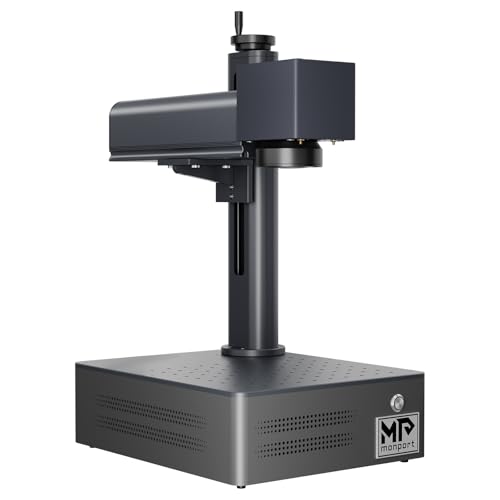
Monport
$1,299.99
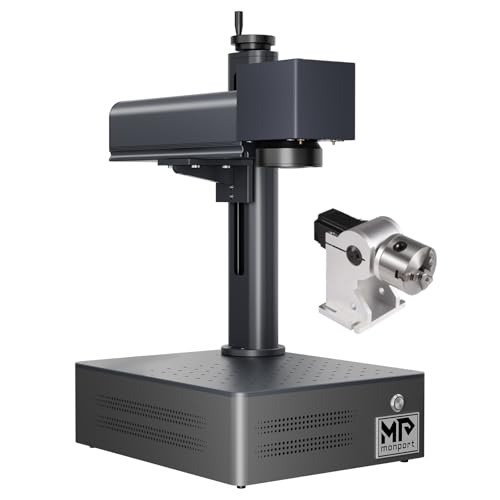
Monport
$3,749.99
Spec-by-Spec Comparison
| Spec | Monport 20W Fiber Laser Engraver | Monport 60W JPT MOPA Fiber Laser |
|---|---|---|
| Wattage | 20 W | 60 W |
| Laser Type | Q-Switched | MOPA |
| Laser Source | Raycus | JPT |
| Work Area (W) | 110 mm | 175 mm |
| Work Area (H) | 110 mm | 175 mm |
| Galvo Speed | 7000 mm/s | 8000 mm/s |
| Color Marking | No | Yes |
| LightBurn | Yes | Yes |
| Autofocus | No | No |
| Weight | 3.2 kg | 5 kg |
| Software | BSLcad + LightBurn (galvo license required separately) | BSLcad + LightBurn (galvo license required separately) |
| Pulse Width | N/A (Q-Switched) | 2–500ns |
| Price | $1,299.99 | $3,749.99 |
| Rating | 6.5/10 | 7.5/10 |
| Buy on Amazon | Buy on Amazon |
Pros & Cons
Monport 20W Fiber Laser Engraver
Pros
- The current Amazon title explicitly says LightBurn compatible and BSLcad included; confirm controller and license requirements with the seller
- Raycus 20W source marks stainless steel, aluminum, brass, titanium, copper, and anodized aluminum consistently — the same source family used in machines twice the price
- Q-switched monochrome marks are deep and durable — serial numbers, logos, and ID marks survive heavy daily use without fading or rubbing off
- 110×110mm work area covers rings, dog tags, knife blade sections, and metal business cards without repositioning
- 3.2kg form factor is genuinely portable — moves between bench and jobsite without fixed infrastructure or dedicated workspace
Cons
- LightBurn setup on the BSLFiber controller is poorly documented — LightBurn forum (Jan 2025) rated Monport's galvo setup instructions 'horrible'; expect troubleshooting before first successful job
- The catalog's 10,000mm/s speed claim trails GWEIKE's 15,000mm/s claim; neither title-only claim proves real-job throughput
- No color marking — Q-switched fixed pulse width cannot produce oxidation colors on stainless steel regardless of settings or software
- No autofocus — manual Z-axis height setup required for every material change or thickness variation; a friction point that dedicated color-marking workflows cannot absorb
- BSLcad community resources are nearly nonexistent — unlike GWEIKE or OMTech, no active forum threads, settings libraries, or YouTube tutorials specific to BSLcad workflows
Monport 60W JPT MOPA Fiber Laser
Pros
- The current title identifies a 60W JPT MOPA configuration, 6.9-inch square field, and rotary axis; confirm the exact bundle with the seller
- 175×175mm work area confirmed on the Amazon listing — accommodates full-size tumblers with a rotary chuck without lens swaps
- LightBurn galvo support confirmed via BSLcad controller — Amazon listing explicitly states 'All Monport fiber marking machines can be operated using Lightburn'
- 1–4,000kHz frequency range and 2–500ns pulse width provide the full MOPA parameter envelope for stainless steel color marking and titanium anodization
- 60W output is meaningfully faster than 30W for deep engraving — depth-map coin engraving documented by a Reddit owner using LightBurn 3D slice at production-viable speeds
Cons
- Only 16 Amazon ratings — too thin to verify factory QC or catch edge-case failures; at this wattage, a single DOA unit would represent 6% of all reviews
- No community material libraries for BSLcad exist anywhere — owners building color marking settings start from zero; the LightBurn parameter libraries that circulate for OMG Laser and ComMarker do not transfer
- In buyer comparison threads for 60W MOPA, Monport was explicitly excluded from recommendations due to 'unclear specs, lack of real user feedback' — OMG Laser and Haotian dominate those conversations
- MOPA settings complexity is brand-documented as brutal for newcomers — one Reddit owner described the transition from CO2 as 'feeling like I've never used technology before' with their Monport MOPA
- 60W is a Class 4 open-beam laser — no enclosure, invisible 1064nm infrared beam, requires OD5+ eyewear and a dedicated controlled workspace; not a beginner purchase at any price
Our Verdicts
Monport 20W Fiber Laser Engraver
The Monport 20W remains a basic metal-marking option for buyers prepared to self-support a thinly documented BSLcad and LightBurn setup. The verified Amazon offer was $1,299.99 with limited stock on July 10, 2026, not the historical $349 configuration described in older copy. At essentially the same verified price as the GWEIKE G2 20W, choose on software support, work area, and seller terms rather than an outdated budget claim.
Monport 60W JPT MOPA Fiber Laser
The Monport 60W MOPA is an available high-wattage configuration for experienced operators prepared to self-support a thin BSLcad ecosystem. The verified Amazon offer was $3,749.99 with limited stock on July 10, 2026, not under $1,000. Compare controller, work area, lens bundle, support, and return terms before checkout.