At a Glance
Best For
Overview
The Monport 20W Fiber Laser is the cheapest path into real fiber laser engraving on Amazon, full stop. The question is whether the savings are worth what you give up around it.
The answer hinges on documentation and community support. The Raycus source itself is well-proven; it marks stainless steel, aluminum, brass, titanium, and copper with the deep, permanent monochrome engravings that fiber lasers are known for. LightBurn galvo support is now confirmed (the older 'EZCad-only' framing in 2023-era reviews is outdated), so the machine no longer locks you into an unfamiliar workflow if you came from a diode laser. But the BSLFiber controller's LightBurn setup is poorly documented — the LightBurn forum has explicitly rated Monport's galvo instructions 'horrible' (Jan 2025), and BSLcad has no real community presence: no Etsy settings packs, no YouTube tutorial library, no Reddit threads to search when you hit your first weird issue. You are largely on your own.
For experienced fiber laser operators stepping down to a backup unit, or for hobbyists with the patience to troubleshoot through the documentation gap, the Monport 20W is a defensible value purchase.
Pros & Cons
Pros
- The current Amazon title explicitly says LightBurn compatible and BSLcad included; confirm controller and license requirements with the seller
- Raycus 20W source marks stainless steel, aluminum, brass, titanium, copper, and anodized aluminum consistently — the same source family used in machines twice the price
- Q-switched monochrome marks are deep and durable — serial numbers, logos, and ID marks survive heavy daily use without fading or rubbing off
- 110×110mm work area covers rings, dog tags, knife blade sections, and metal business cards without repositioning
- 3.2kg form factor is genuinely portable — moves between bench and jobsite without fixed infrastructure or dedicated workspace
Cons
- LightBurn setup on the BSLFiber controller is poorly documented — LightBurn forum (Jan 2025) rated Monport's galvo setup instructions 'horrible'; expect troubleshooting before first successful job
- The catalog's 10,000mm/s speed claim trails GWEIKE's 15,000mm/s claim; neither title-only claim proves real-job throughput
- No color marking — Q-switched fixed pulse width cannot produce oxidation colors on stainless steel regardless of settings or software
- No autofocus — manual Z-axis height setup required for every material change or thickness variation; a friction point that dedicated color-marking workflows cannot absorb
- BSLcad community resources are nearly nonexistent — unlike GWEIKE or OMTech, no active forum threads, settings libraries, or YouTube tutorials specific to BSLcad workflows
Build Quality & Design
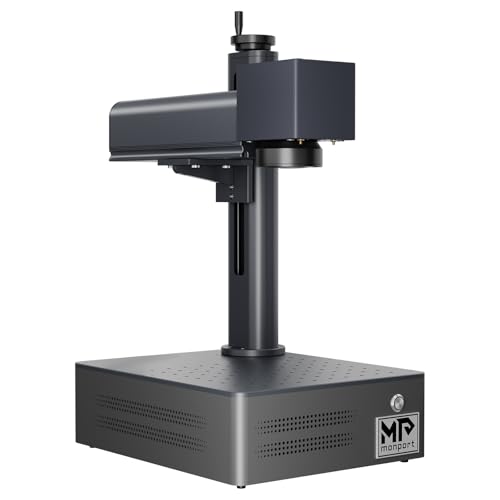
The Monport 20W is built around a 3.2 kg portable chassis — the lightest in this guide's lineup of 20W machines. The split/portable form factor sits comfortably on any bench and travels between locations without dedicated infrastructure, a real advantage for makers without a permanent shop. The build itself is competent: the metal frame is rigid enough that the galvo head holds calibration through normal use, and the included tripod-style adjustable stand handles material height changes adequately if you don't need precision Z-axis indexing.
What you do not get is anything resembling refinement. There is no enclosure — this is an open-frame Class 4 fiber laser emitting an invisible 1064nm infrared beam, and OD5+ laser safety glasses are mandatory whenever it's powered on. The control panel is functional rather than thoughtful, and there's no built-in touchscreen for job status or parameter adjustment without going back to your tethered computer. Material height adjustment is manual via the column-mounted laser head, which means every material change or thickness variation is a focus exercise you have to perform yourself.
The single biggest design tradeoff at this price is the absence of autofocus. For a hobbyist running occasional jobs across mixed materials, that means measuring height with a ruler or focusing by ear (listening for the cleanest mark sound) every single time.
Laser Source & Performance
The Raycus 20W Q-switched source is the Monport's strongest argument. The source produces clean, deep, repeatable monochrome marks at 0.01mm precision on stainless steel, aluminum, brass, silver, titanium, and copper. The marks are the real thing — durable enough for serial numbers, identification plates, and logo marking that needs to survive years of use.
The galvo runs at 10,000mm/s (some sources list 7,000mm/s, depending on the configuration ordered) — meaningfully slower than the GWEIKE G2 20W's 15,000mm/s, and you'll feel that gap on any design with significant infill area. For light text marking on jewelry or simple logos on tools, the speed differential is minor. For batched designs covering 50% or more of the work area, the Monport takes meaningfully longer per part — and on production runs of 50+ units, the cumulative time delta against the G2 is not trivial.
The limitation is fundamental: this is a Q-switched machine with fixed pulse width. There is no path to color marking on stainless steel. The vivid blues, reds, and gold tones that MOPA machines produce through pulse-width oxidation control are physically impossible here regardless of software, settings, or skill. If your future plans include selling color-marked tumblers, anodized titanium pieces, or any other color-dependent work, the Monport is a dead-end purchase that will need to be replaced with a MOPA machine the moment you scale into that work.
Software & Workflow
Two years ago this was a much weaker position — Monport was widely described as EZCad-only — but the LightBurn compatibility is now genuinely confirmed across owner reports. If you've used LightBurn on a diode or CO₂ laser, you can continue that workflow on the Monport without learning a new tool.
The execution is the catch. Setting up LightBurn on the BSLFiber controller is not turnkey. The LightBurn community forum has bluntly described Monport's galvo setup documentation as 'horrible' in posts as recent as January 2025, and the typical first-time setup involves several hours of trial-and-error before achieving a successful test mark. The standard fixes — focal length calibration, x/y axis mirror swaps, lens correction file loading — are all required steps that the documentation does not walk through clearly. Experienced fiber operators figure it out; beginners often give up and use BSLcad instead.
BSLcad itself works, but it's the weakest community ecosystem of any major Chinese fiber laser controller. Unlike EZCad2 (which has decades of legacy documentation and tutorial content), and unlike LightBurn (which has an active forum and a growing settings library), BSLcad has almost no searchable tutorial content, no shared parameter libraries, and no public troubleshooting threads for problem patterns. When something goes wrong, you'll be communicating with Monport's WhatsApp support directly — and US business hours don't align well with their China-based response timing.
Use-Case Performance
For jewelry and small precious-metal work, the Monport 20W performs to spec. Rings, pendants, and small plaques engrave cleanly in monochrome on gold, silver, and brass; the 110×110mm work area accommodates standard jewelry pieces with room to spare; the 20W Raycus source delivers fine-detail capability appropriate for inside-band engraving and curved pendant work. The lack of autofocus is annoying on irregular-height pieces (cast rings, hand-forged bracelet sections), but workable.
For knife marking, results are good for utility purposes — maker's marks, model numbers, and serial numbers all mark cleanly on standard high-carbon and tool steels. The 110mm field is short enough that anything longer than a typical pocket knife requires repositioning; if your work includes hunting knives, kitchen knives, or longer blades, the workflow friction adds up across batches. Buyers who already know they make full-length blades should step up to a 175mm machine (ComMarker B4 30W or B4 60W MOPA).
For business or batch production, the Monport is the wrong tool past a certain throughput threshold. The combination of slow galvo speed (10,000mm/s vs. 15,000mm/s on the G2), manual focus, and no community settings library means each new product requires its own from-scratch parameter development. If batch volume is in your roadmap, this is the wrong starting point.
For tumblers and drinkware, the answer is don't — even with a rotary attachment, the 110mm field is too small for standard 20–30 oz tumblers without repositioning, and the Q-switched architecture means no color marking. If tumblers are even part of your roadmap, the ComMarker B6 at 150mm or a MOPA machine at any size is the correct choice from day one.
Value & Verdict
There is no other machine that delivers a real Raycus source, real LightBurn compatibility, and real metal-marking capability at this price.
Our Verdict
The Monport 20W remains a basic metal-marking option for buyers prepared to self-support a thinly documented BSLcad and LightBurn setup. The verified Amazon offer was $1,299.99 with limited stock on July 10, 2026, not the historical $349 configuration described in older copy. At essentially the same verified price as the GWEIKE G2 20W, choose on software support, work area, and seller terms rather than an outdated budget claim.
| Full Specifications | |
|---|---|
| Wattage | 20W |
| Laser Type | Q-Switched |
| Laser Source | Raycus |
| Work Area (W) | 110mm |
| Work Area (H) | 110mm |
| Galvo Speed | 7000mm/s |
| Color Marking | No |
| LightBurn | Yes |
| Autofocus | No |
| Focal Length | 160mm |
| Weight | 3.2kg |
| Form Factor | portable |
| Software | BSLcad + LightBurn (galvo license required separately) |
| Pulse Width | N/A (Q-Switched) |
Frequently Asked Questions
Will it mark hardened tool steel and knife blades?
Compare With Similar Fiber Laser Engravers
Head-to-Head Comparisons
Monport 20W Fiber Laser Engraver
$1,299.99
Amazon offer checked 2026-07-10. Price and availability can change.