At a Glance
Best For
Overview
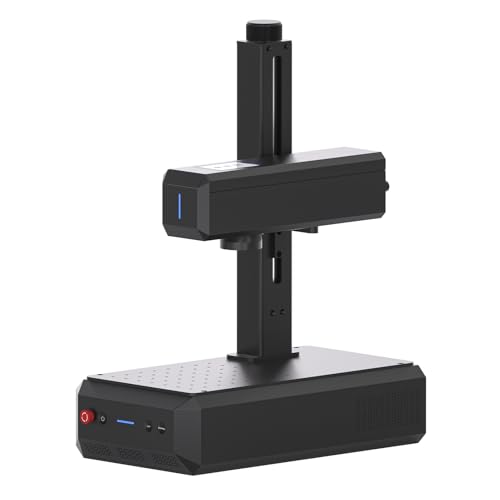
The ComMarker B6 20W lands in a narrow window: a 150×150mm work area paired with one-touch autofocus at a price that undercuts most alternatives with comparable specs. For buyers who mark tumblers, full knife blades, or medium plaques, the extra 40mm of workspace over a 110mm machine eliminates repositioning and opens use cases that smaller fields simply cannot handle.
Inside the B6 is a Raycus 20W Q-switched fiber laser source — the same source family found in machines costing twice as much. It marks stainless steel, aluminum, brass, titanium, and copper with the deep, permanent monochrome engravings that fiber lasers are known for. But the Q-switched architecture is also a hard ceiling: there is no pulse-width control, which means no oxidation color marking on stainless steel regardless of settings or software tweaks. If color work is in your plans, the B6 is the wrong machine, full stop.
Where the B6 earns its rating is workflow efficiency. The built-in touchscreen display, autofocus, and LightBurn compatibility remove friction that budget competitors still force you to tolerate. It is not a perfect machine — the open-frame design demands a controlled workspace, the rotary attachment for tumblers is an extra purchase, and the owner community is thinner than what GWEIKE has built. But for monochrome metal marking on larger pieces, the B6 delivers more features per dollar than anything else at this price.
Pros & Cons
Pros
- 150×150mm work area — 35% larger than the GWEIKE G2's 110mm field — fits tumblers on a rotary chuck and full knife blades without repositioning
- The current title identifies an autofocus screen, a meaningful workflow distinction from manual-focus 20W alternatives
- LightBurn confirmed working with EZCad also included — both workflows supported; buyers coming from diode lasers have immediate LightBurn continuity
- Built-in touchscreen display for settings and job status — removes the need to monitor a laptop during production runs
- 20W Raycus Q-switched marks steel, aluminum, brass, titanium, and copper consistently — ComMarker's production volume means quality control is verified across thousands of units
Cons
- Cataloged as Q-switched rather than MOPA; compare a currently available MOPA configuration when pulse-width control is required
- No enclosure — Class 4 open-beam fiber laser; the invisible 1064nm infrared beam requires OD5+ eyewear and either a dedicated enclosure or a controlled workspace with no reflective surfaces
- Thinner community than GWEIKE — fewer Reddit threads and YouTube settings tutorials; troubleshooting depends more on ComMarker support channels than community knowledge
- The current title does not confirm an included rotary; verify the exact bundle before planning cylindrical work
Build Quality & Design
The B6 weighs 3.5 kg and carries a compact, portable form factor that sits comfortably on a standard workbench. Reviewers consistently describe the metal chassis as solid and well-packaged, with none of the plasticky feel that budget laser machines sometimes ship with. The split/desktop design means you can move it between stations without dedicating permanent infrastructure, a genuine advantage for makers with limited shop space.
The standout hardware feature is the one-touch LED touchscreen autofocus. On competing machines in this price range, every material change or thickness variation requires manual Z-axis adjustment — a friction point that adds minutes to every session and introduces human error. The B6's autofocus eliminates that step entirely; reviewers who upgraded from the older ComMarker B4 describe it as a legitimate workflow upgrade that saves time on every job. That said, some owners report that autofocus can be inconsistent on critical jobs and still require manual verification, so it is best treated as a time-saver rather than a set-and-forget system.
What the B6 does not include is an enclosure. This is an open-frame Class 4 fiber laser emitting an invisible 1064nm infrared beam. OD5+ laser safety glasses are mandatory, reflective surfaces must be controlled, and bystanders must be kept clear. For indoor studio use, budgeting for an aftermarket enclosure or a dedicated isolated workspace is not optional — it is a safety requirement.
Laser Source & Performance
The Raycus 20W Q-switched source inside the B6 is a proven industrial-grade laser with a rated lifespan that matches sources in machines costing significantly more. It produces clean, crisp monochrome marks at 0.01mm precision on stainless steel, aluminum, brass, silver, and titanium. The marks are deep and durable — serial numbers, logos, and identification plates survive heavy daily use without fading or rubbing off.
The 150×150mm work area is the key differentiator at this price. A 110mm field rules out full tumblers and forces repositioning on longer knife blades; the B6's 150mm field handles both in a single setup. The galvo system runs at 8,000mm/s — fast enough for production batch work and noticeably quicker than diode or CO₂ alternatives, though not the fastest in the 20W class. For high-infill designs or volume production, the speed is sufficient without being class-leading.
The limitation is fixed: this is a Q-switched machine, not MOPA. There is no variable pulse width, no frequency control for oxidation-layer color manipulation, and no path to add color capability later. Stainless steel color marking — the vivid reds, blues, and blacks that MOPA machines produce — is physically impossible on the B6. If your use case includes color tumblers, decorative jewelry, or any oxidation-color work, the B6 cannot do it regardless of settings, power, or software.
Software & Workflow
The B6 ships with both EZCad2 and LightBurn compatibility, which covers two distinct user workflows. EZCad2 is the traditional fiber laser control interface; LightBurn is the modern choice for users coming from diode or CO₂ lasers who want a familiar design environment. ComMarker lists LightBurn compatibility prominently, and owner reports confirm it works without custom drivers or workarounds — a meaningful advantage over machines that lock you into EZCad-only operation.
The built-in touchscreen display is a genuine workflow addition that competitors lack. It shows job status, parameter settings, and autofocus controls without requiring a tethered laptop monitor during production runs. For batch operations where the computer sits across the room, being able to check status or adjust power directly on the machine saves steps.
The software downside is community depth. GWEIKE has an active ecosystem of YouTube tutorials, LightBurn forum threads, and shared settings libraries indexed specifically for the G2. For the B6 20W, community discussion is thinner — no dedicated Reddit threads surfaced for this exact model as of mid-2026, and troubleshooting relies more on ComMarker's support channels than on crowdsourced knowledge. The documentation is also described as limited by some owners, meaning beginners should expect a learning curve and some self-directed experimentation.
Use-Case Performance
The 150mm field accommodates standard 20–30 oz tumblers on a chuck rotary without the tight clearances that plague 110mm machines. Engraving quality on stainless tumblers is clean and permanent in grayscale, with crisp text and logos. The catch remains color: the Q-switched source produces only monochrome marks. If you are selling custom tumblers and buyers expect vivid color, you will need a MOPA machine instead.
Knife and blade marking is a genuine strength. Fiber lasers are ideal for tool steel and stainless blades; the B6's 20W Raycus source delivers fast, deep, permanent marks that multiple reviewers confirmed as excellent on knife steel. The 150mm field covers most blade lengths without repositioning, and autofocus is helpful when blades vary in thickness or when marking across a bevel.
Jewelry and precious metals also perform strongly. Gold, silver, platinum, and brass all engrave cleanly at 0.01mm precision, and the 150×150mm work area is more than adequate for rings, pendants, and small plaques. Autofocus helps with irregular-height pieces like cast rings or curved bracelet segments, though some owners still manually verify focus on high-value items.
For small business and bulk production, the B6 is viable but not turnkey. The 8,000mm/s galvo speed keeps per-part cycle times short, and the touchscreen allows basic job monitoring without a dedicated operator at the laptop. However, the open-frame design and required computer tethering add friction compared to enclosed industrial units. The lack of wireless connectivity means the machine must stay USB-tethered to a computer running LightBurn or EZCad, which limits shop layout flexibility.
Value & Verdict
For buyers who regularly mark tumblers, full knife blades, or medium plaques, the larger field eliminates repositioning and justifies the extra cost on efficiency alone. The autofocus removes a daily friction point that every 110mm competitor still forces you to manage manually.
The tradeoffs are real and should not be minimized. The B6 is Q-switched only — no color marking, ever. It ships without an enclosure, without a rotary attachment, and with a thinner community support base than GWEIKE. If you are a total beginner expecting plug-and-play color tumblers, this is the wrong machine. If you are a maker or small business operator who needs reliable monochrome metal marking on larger pieces and values workflow convenience, the B6 is the best-equipped option in this price tier.
Buy the ComMarker B6 20W if: work area matters for your typical pieces, you want autofocus at a budget price, and color marking is not on your roadmap. Skip it if: stainless steel color is a requirement, you need a turnkey enclosed setup, or you rely heavily on community troubleshooting resources.
Our Verdict
The ComMarker B6 is the 20W option to compare when a 150mm field and autofocus matter more than MOPA pulse control. The verified Amazon offer was $1,599 on July 10, 2026. That price removes it from any under-$600 decision path. If color work is required, compare an available MOPA configuration instead of following the currently unavailable OMTech 30W exit.
| Full Specifications | |
|---|---|
| Wattage | 20W |
| Laser Type | Q-Switched |
| Laser Source | Raycus |
| Work Area (W) | 150mm |
| Work Area (H) | 150mm |
| Galvo Speed | 8000mm/s |
| Color Marking | No |
| LightBurn | Yes |
| Autofocus | Yes |
| Focal Length | 163mm |
| Weight | 3.5kg |
| Form Factor | portable |
| Software | LightBurn + EZCad |
| Pulse Width | N/A (Q-Switched) |
Frequently Asked Questions
What is the work area?
Can it do color marking?
Is the B6 better than the B4?
Related Buying Guides
Compare With Similar Fiber Laser Engravers
Head-to-Head Comparisons
ComMarker B6 20W Fiber Laser Engraver
$1,599
Amazon offer checked 2026-07-10. Price and availability can change.