At a Glance
Best For
Overview
The Monport's price is an outlier that breaks the established MOPA market structure, and the question every potential buyer needs to answer first is whether the deal is real or whether you're paying with hidden costs in setup, support, and documentation.
The MOPA hardware is real. Color marking on stainless steel — the vivid blues, reds, gold, and black tones that Q-switched machines physically cannot produce — is achievable on this machine once parameters are dialed in. The capability is not marketing fiction.
The hidden costs are real, too. MOPA settings are exponentially more complex than Q-switched. Frequency, pulse width, power, and speed interact in non-obvious ways, and the parameter space for color marking on stainless involves hundreds of viable combinations with most of them producing wrong colors or uneven marks. The Monport ships with BSLcad software that has nearly zero community presence: no Etsy settings packs, no YouTube tutorial libraries, no Reddit threads for the specific MOPA-on-BSLcad workflow. Owners describe the transition from CO2 or diode lasers as feeling like they've 'never used technology before' — and that's not hyperbole. You will build your material library from scratch, alone, with documentation that the LightBurn forum has rated 'horrible' for Monport galvo setup.
Pros & Cons
Pros
- The current title identifies a 30W JPT MOPA configuration with BSLcad and LightBurn references; verify the exact controller and bundle before buying
- JPT MOPA source with 2–500ns variable pulse width — the physics required for oxide-layer color marking on stainless steel are present; this is confirmed hardware, not a marketing claim
- BSLcad bundled with LightBurn galvo support available — not EZCad2; buyers from diode lasers can continue a LightBurn workflow (galvo license purchased separately)
- 30W output handles deep engraving on stainless, aluminum, and brass in fewer passes than any 20W Q-switched alternative
- Color marking on stainless, titanium, and anodized aluminum is achievable once settings are dialed — a capability this price tier has no business offering
Cons
- MOPA settings are not plug-and-play — frequency, pulse width, and power interact in non-obvious ways; one Reddit owner described the transition from CO2 as 'feeling like I've never used technology before' after buying a Monport MOPA
- No material parameter library for BSLcad exists in any community channel — unlike OMTech or ComMarker, no Etsy settings packs or forum parameter threads exist for this specific machine
- Monport's documentation rated 'horrible' for galvo setup by experienced fiber users — expect several hours of calibration before achieving first successful color mark
- The current Amazon title states a 6.9×6.9-inch work area; confirm the exact lens and usable field with the seller before checkout
- Very thin review base — this is a recent Amazon listing; no volume of owner feedback exists to verify factory QC or consistency across units
Build Quality & Design
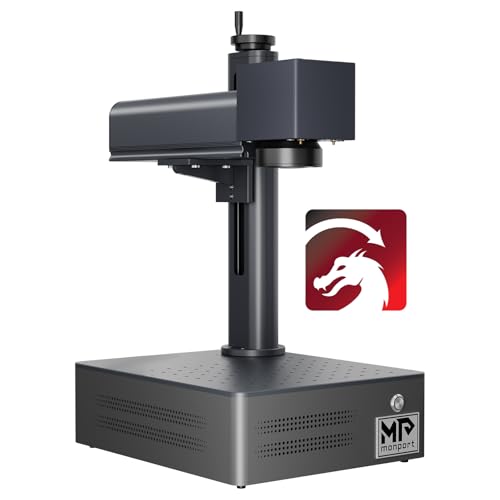
The Monport 30W MOPA is built around a 4 kg portable chassis — slightly heavier than its 20W sibling reflecting the larger MOPA source assembly inside. The form factor is split/portable: the laser head detaches from the column, the control box sits separately, and the whole machine fits on a standard workbench without dedicated infrastructure.
What you do not get at this price is anything resembling polish. There's no enclosure (this is an open-frame Class 4 laser emitting an invisible 1064nm infrared beam — OD5+ eyewear mandatory), no built-in touchscreen, no autofocus, and a control panel that's functional rather than thoughtful. Material height adjustment is fully manual via the column-mounted laser head, which means every material change in a MOPA color workflow — and color workflows often span multiple materials in a single session — is a focus exercise you perform yourself.
The most important configuration detail is the work area. That field is sufficient for jewelry, dog tags, blade sections, coin marking, and small plaques; it's too small for full tumblers, large nameplates, or long knife blades. For color tumbler work specifically — which is one of the highest-value use cases of MOPA — the 110mm field forces repositioning, which makes consistent color band placement difficult and unreliable.
The other underdocumented detail: this is a very recent Amazon listing with thin review volume. Factory QC patterns aren't yet visible in owner reports, and the support infrastructure for hardware failures is correspondingly thin. If you receive a DOA unit or experience early hardware degradation, you'll be in Monport's WhatsApp support queue on China business hours — not what you want when a production-ready machine fails.
Laser Source & Performance
The JPT MOPA source is the Monport 30W MOPA's strongest argument. The 2–500ns variable pulse-width range is the genuine MOPA envelope — the same range that ships in OMTech, ComMarker B4 MOPA, and many higher-priced JPT-sourced machines. The hardware is not artificially limited.
The 30W output handles standard monochrome marking on stainless steel, aluminum, brass, titanium, and copper at production-acceptable speeds. Compared to a 20W Q-switched machine, the 30W MOPA delivers deeper marks in fewer passes, which matters for marks that need to be visible on coated or anodized surfaces. The 8,000mm/s galvo speed is slower than the GWEIKE G2 20W's 15,000mm/s, but the per-mark depth advantage of the 30W source offsets the speed differential on most utility marking work.
The MOPA color capability is the entire reason this machine exists. With pulse width tuning between 2–500ns, the Monport can produce oxide-layer color marks on stainless steel (blues, reds, purples, gold, blacks) and full color anodization-style marks on titanium. The physics is identical to what OMTech and ComMarker MOPA machines produce; the achievable color quality depends entirely on the operator's parameter tuning skill. Some Reddit owners have achieved striking results on stainless tumblers with the Monport; others have spent weeks tuning without producing a single clean color band. The capability is real; the ease of accessing it is not.
The Monport's specific weakness in MOPA performance comes from the BSLcad controller's pulse-width parameter interaction. Where LightBurn on JCZ-based controllers (OMTech, GWEIKE Pro) exposes pulse-width control directly in the layer dialog, BSLcad routes it through a less-intuitive interface. The community fix — using LightBurn galvo with the optional license — works but requires the documentation gymnastics described in the next section. The practical result: getting MOPA color to work on the Monport is a multi-week skill development project for most owners. Plan for it.
Software & Workflow
Both options work; neither is turnkey for MOPA color workflows.
BSLcad is the cheaper option and the path of least resistance for monochrome marking. The interface is dated but functional for basic engraving and cutting. The catastrophic weakness for a MOPA machine is parameter library depth: BSLcad has nearly zero community presence — no Etsy parameter packs, no YouTube MOPA-color tutorials specific to BSLcad, no Reddit threads for color marking on BSLcad. Every parameter, every color band setting, every pulse-width tuning insight starts from zero. For Q-switched machines this is annoying; for MOPA where the parameter space is exponentially larger, it's debilitating.
LightBurn (with the galvo license) is the better path for MOPA work, but the setup on BSLFiber controllers is the documentation gap that haunts every Monport buyer. The LightBurn forum has explicitly rated Monport's galvo setup instructions 'horrible' (Jan 2025), and the typical first-time setup involves several hours of trial-and-error before achieving a successful test mark. The standard fixes — focal length calibration, x/y axis mirror swaps, lens correction file loading, COR file handling — are all required steps that the documentation does not walk through clearly. Once LightBurn is running, you get the modern UI and the active LightBurn community, but you do not get a Monport-specific MOPA parameter library — community LightBurn settings packs are written for OMTech and ComMarker controllers, not BSLFiber, and the parameter values do not always transfer cleanly.
The net effect for a MOPA color workflow: expect 2–4 weeks of skill development before you produce consistent color marks. Owners describe the experience in stark terms — one Reddit thread captured it as 'feeling like I've never used technology before' after switching from CO2 to a Monport MOPA. The capability is there; the path to using it is unsupported.
Monport's customer support is WhatsApp-only with slow US response times. The relevant context: you will encounter problems that require support input, especially in the first month, and you will wait.
Use-Case Performance
The Monport 30W MOPA is only the right purchase when you actively need MOPA color capability.
For color marking on stainless steel (the primary MOPA value proposition), the Monport delivers the hardware required for it but not the workflow. Once parameters are dialed in, the color quality is comparable to what OMTech and ComMarker MOPA machines produce — same JPT source, same pulse-width control. Getting there is the issue: expect 2–4 weeks of parameter development to produce consistent color bands, and expect to lose materials during that period. Owners producing color tumblers commercially with the Monport report this as feasible but only after substantial investment in calibration.
For titanium color marking (anodization-style multi-color effects), the Monport works once dialed in. Titanium is more forgiving than stainless for color marking; the parameter space is smaller and the published Q-switched/MOPA settings translate more directly. For jewelry makers and watch case workers working on titanium specifically, the Monport is more accessible than for stainless tumbler operators.
For jewelry and small precious metals, the 30W MOPA is overkill for monochrome work but useful for color tone modulation. Multiple Reddit owners have produced graduated tone effects on silver and gold using MOPA pulse-width modulation — capability the cheaper 20W Q-switched machines cannot produce. The 110mm field is sufficient for any standard jewelry piece.
For business or production work, the answer depends entirely on whether you've already done the parameter development work. Monport 30W MOPA as a primary production machine is viable only after you've built your own material library. As a first MOPA purchase, it's the wrong starting point — your production output will suffer for months while you develop settings.
Value & Verdict
For an experienced MOPA operator who knows what they're doing — someone migrating from another MOPA machine, or someone with a strong fiber laser background who's confident in calibration — the Monport is a defensible value. For everyone else, the OMTech is the correct purchase.
Skip it if: this is your first fiber laser, you need a turnkey color marking workflow, you make tumblers commercially (the 110mm field is too small), or your tolerance for setup-phase frustration is low. The cheapness of this machine is real, but the cheapness is paid for with your time.
Our Verdict
The Monport 30W MOPA is relevant to experienced operators who need variable pulse-width control and are prepared for thin BSLcad-specific documentation. The verified Amazon offer was $2,899.99 with limited stock on July 10, 2026, not $599. At that price, compare support, controller, lens, work area, and return terms against other available MOPA configurations before buying.
| Full Specifications | |
|---|---|
| Wattage | 30W |
| Laser Type | MOPA |
| Laser Source | JPT |
| Work Area (W) | 175mm |
| Work Area (H) | 175mm |
| Galvo Speed | 8000mm/s |
| Color Marking | Yes |
| LightBurn | Yes |
| Autofocus | No |
| Focal Length | 160mm |
| Weight | 4kg |
| Form Factor | portable |
| Software | BSLcad + LightBurn (galvo license required separately) |
| Pulse Width | 2–500ns |
Related Buying Guides
Compare With Similar Fiber Laser Engravers
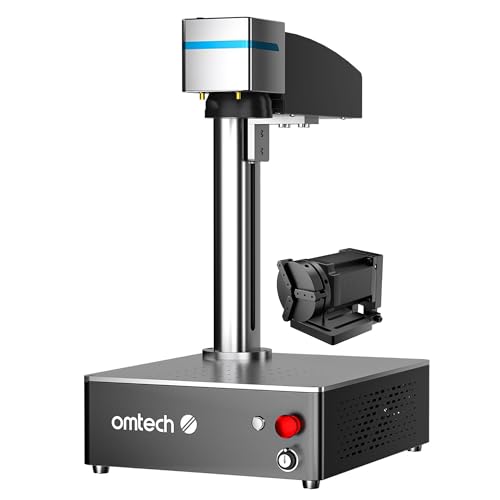
OMTech
30W JPT MOPA
30 W · MOPA · Yes
No current Amazon offer
Head-to-Head Comparisons
Monport 30W JPT MOPA Fiber Laser
$2,899.99
Amazon offer checked 2026-07-10. Price and availability can change.