At a Glance
Best For
Overview
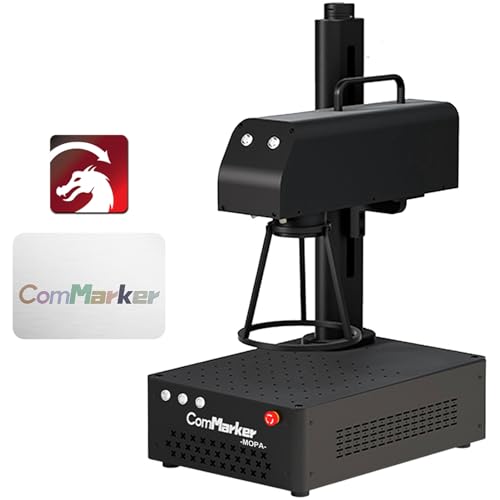
This is a 60W JPT M7 MOPA source in a portable, open-frame chassis that supports both desktop and handheld marking.
But the caveats are real and worth stating upfront. The B4 ships without an enclosure — the 1064nm infrared beam is invisible and requires OD6+ eyewear plus a controlled workspace. There is no autofocus; every workpiece height change means manual Z-axis adjustment. LightBurn compatibility exists, yet it is not plug-and-play — you will spend your first session loading a COR file and configuring galvo axes before seeing a correct mark. Color marking, while physically possible, demands systematic material testing and is not a beginner-friendly feature out of the box.
Perhaps most importantly, the B4 MOPA line appears to be end-of-life inventory. ComMarker has shifted focus to the B6 MOPA, which adds autofocus and an updated form factor while keeping the same 60W JPT source. ASIN B0CGX9TBGQ is still listed on Amazon, but community tutorials and settings libraries will increasingly reference the B6 going forward. Buy this machine for what it is — a powerful, slightly raw tool at a remarkable price — not for long-term brand support.
Pros & Cons
Pros
- JPT M7 MOPA source confirmed — wider frequency range (1–4,000kHz) and tighter pulse consistency than Raycus Q-switched alternatives at any price; the datasheet comes in the box
- The catalog combines 60W MOPA and a 10,000mm/s speed claim; production throughput still depends on material, settings, field, and workflow
- LightBurn compatible via COR file — both LightBurn and EZCad2 workflows supported; JPT M7's full pulse-width parameter range is accessible from LightBurn's galvo interface once configured
- Rust cleaning at 60W is a documented bonus capability — removes surface oxide from steel without abrasives, useful as pre-treatment before color marking on weathered material
- Foot pedal input, job preview function, and fan that only runs during active engraving — the small-business production workflow details that distinguish a tool from a toy
Cons
- LightBurn setup requires loading a COR file and manually configuring galvo axis, Q-Pulse Width, and frequency settings — LightBurn forum (April 2026) shows new owners needing 30+ minutes before getting first correct results; not auto-detected
- No autofocus — manual Z-axis focus required for every workpiece height change; the B6 MOPA, ComMarker's current flagship, corrects this limitation
- B4 MOPA line is end-of-life inventory — ComMarker now promotes the B6 MOPA (autofocus, updated form factor, same 60W power); ASIN B0CGX9TBGQ remains on Amazon but community resources will increasingly reference the B6 going forward
- Color marking requires calibration per material batch — powder coat thickness and alloy composition vary even within the same tumbler brand, requiring fresh test grids for each new batch
- No enclosure — Class 4 open-beam 1064nm infrared; requires OD6+ eyewear at 60W and either ComMarker's Safety Enclosure Pro or a dedicated controlled workspace
Build Quality & Design
The B4 is a 5.5kg portable unit that assembles in roughly ten minutes with a few screws, according to ComMarker's own blog and video review summaries. The chassis supports both desktop and handheld modes — a genuine differentiator for on-site marking jobs that won't fit on a bench. A foot pedal input, job preview function, and a cooling fan that only spins during active engraving round out the small-business production details.
The design is strictly open-frame. There is no enclosure, no lid, and no interlock — this is a Class 4 laser emitting an invisible 1064nm beam that can cause instant eye injury. You must either purchase ComMarker's optional Safety Enclosure Pro separately or build your own controlled workspace. There is also no autofocus; the newer B6 corrects this limitation, but on the B4 every material thickness change requires manual Z-axis adjustment. Compared to the fully enclosed xTool F1 Ultra, the B4 is a workshop power tool, not a desktop appliance. Build quality itself is solid — the JPT source arrives with its datasheet in the box, which is more documentation than many competitors provide — but the lack of integrated safety hardware is a meaningful gap at this price.
Laser Source & Performance
The JPT M7 MOPA source is the headline here, and it is the real thing. Multiple independent sources — HobbyLaserCutters (September 2025), MellowPine, and ComMarker's own blog — confirm this is a genuine JPT M7, not a Raycus clone. The reviewer at HobbyLaserCutters specifically praised the switch from Raycus to JPT, noting the wider frequency range and better stability, and received the source datasheet in the box.
Output is 60W with a galvo scan speed up to 10,000 mm/s and a parameter envelope of 1–4,000 kHz frequency and 2–500 ns pulse width. That range is what makes MOPA color marking possible: by controlling pulse width and frequency, the machine thermally grows a controlled oxide layer on stainless steel and titanium, producing colors that Q-switched lasers simply cannot generate. Deep engraving, surface polishing, and even rust cleaning are confirmed capabilities. HobbyLaserCutters and MellowPine both note the machine can cut thin stainless steel up to roughly 2 mm in multiple passes, though metal warping and heat discoloration make this more of a secondary trick than a primary use case.
Software & Workflow
ComMarker includes EZCad2 Lite preconfigured on a USB stick, which gets you marking within minutes of assembly. For most experienced fiber laser operators, EZCad2 is functional but dated. The bigger draw is LightBurn compatibility, and here the picture is mixed.
LightBurn does work — it is listed in the product title and confirmed by the LightBurn forum — but it requires manual configuration. You must load the COR file ComMarker provides, enable Q-Pulse Width, set Galvo 2 as the X axis, and configure Max Frequency to 4,000 kHz and Min Frequency to 1 kHz. A LightBurn forum thread from April 2026 documenting B6 60W MOPA setup shows new owners needing 30-plus minutes before achieving their first correct mark. Skip any of these steps and you will get poor or no results on stainless, even after repeated passes.
The parameter interdependence is also non-intuitive for beginners: high frequency combined with high pulse width produces deep, loud engraving, while low frequency and low pulse width yield a polishing effect. HobbyLaserCutters recommends starting at roughly 200 ns pulse width as a safe baseline. If you are coming from a diode laser background, expect a learning curve — the B4 is not a machine you unbox and run on autopilot.
Use-Case Performance
For jewelry and precious metals, the MOPA pulse width control enables fine engraving on gold, silver, brass, and copper without ablating the surface. Black-and-white marking on gold and silver is confirmed, and color marking on titanium is achievable with dialed settings. Specific jewelry-owner testimonials were not accessible due to Reddit API restrictions, but the hardware capability is well documented by reviewers.
Tumbler and drinkware marking is a popular use case, though it requires a rotary attachment — not included in the base B0CGX9TBGQ Amazon bundle. The community-standard defocus technique (~5.5 mm, lens-dependent) is recommended for cylindrical objects, and LightBurn forum threads show active B4-family users working through tumbler settings. The critical friction point is batch variability: even visually identical tumblers from the same brand can carry different powder coat thickness or alloy composition, meaning a settings grid that worked perfectly on one batch may need recalibration for the next.
Knife and blade marking benefits directly from the 60W output and 10,000 mm/s galvo speed. Deep engraving on mild steel and stainless is confirmed effective by HobbyLaserCutters, and the throughput makes batch blade marking viable for small-business production. Color marking on stainless steel is the B4's signature capability — once settings are dialed for a consistent product line, results are repeatable and described as stunning by reviewers. However, the dialing-in process is real: alloy composition, ambient temperature, and even field lens substrate can shift colors dramatically.
For business and bulk use, the foot pedal, outline preview, and quiet standby mode (fan off when idle) support efficient production workflows. The machine is genuinely capable of small-business throughput. The risk factor is support responsiveness: community notes and general search results cite 24–48 hour turnaround and language barriers, which is not viable if a production line depends on immediate troubleshooting.
Value & Verdict
Buy the B4 60W MOPA if you are an experienced maker or small-business operator who needs true MOPA color marking, deep metal engraving, and can tolerate the setup friction and open-frame safety responsibilities. Skip it if you are a beginner, if you need an enclosed desktop appliance, or if the B6 MOPA is available at a similar price — the B6's autofocus and updated form factor make it the stronger long-term purchase. Verify that ASIN B0CGX9TBGQ is in stock before committing, because this line is end-of-life inventory and replacement availability is not guaranteed.
Our Verdict
The ComMarker B4 60W MOPA remains the highest-rated configuration in this catalog for buyers who value 60W JPT MOPA capability and can work within its field size. The verified Amazon offer was $3,699 with limited stock on July 10, 2026, not under $1,100. Confirm the exact lens bundle, controller, seller terms, price, and stock before treating it as the right production purchase.
| Full Specifications | |
|---|---|
| Wattage | 60W |
| Laser Type | MOPA |
| Laser Source | JPT |
| Work Area (W) | 175mm |
| Work Area (H) | 175mm |
| Galvo Speed | 10000mm/s |
| Color Marking | Yes |
| LightBurn | Yes |
| Autofocus | No |
| Focal Length | 163mm |
| Weight | 5.5kg |
| Form Factor | portable |
| Software | LightBurn + EZCad2 (LightBurn requires COR file setup) |
| Pulse Width | 2–500ns |
Frequently Asked Questions
Does the ComMarker B4 60W MOPA work with LightBurn?
Can the B4 60W MOPA do color marking on stainless steel?
What work area does the B4 60W MOPA have?
Is the ComMarker B4 60W MOPA still in production?
Related Buying Guides
Compare With Similar Fiber Laser Engravers
Head-to-Head Comparisons
ComMarker B4 60W JPT MOPA Fiber Laser
$3,699
Amazon offer checked 2026-07-10. Price and availability can change.