ComMarker B4 60W JPT MOPA Fiber Laser vs GWEIKE G2 20W Fiber Laser Engraver
Head-to-head spec comparison to help you pick the right fiber laser for your needs.
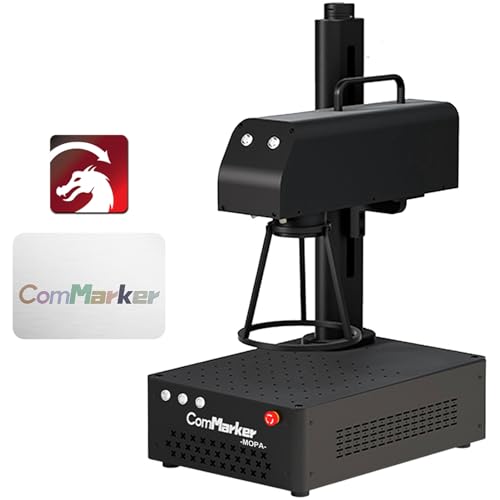
ComMarker
$3,699
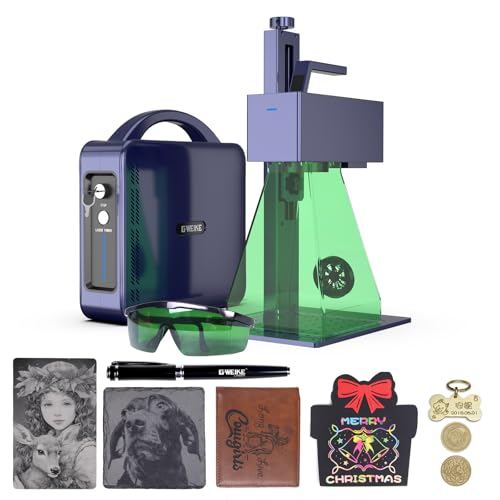
GWEIKE
$1,299
Spec-by-Spec Comparison
| Spec | ComMarker B4 60W JPT MOPA Fiber Laser | GWEIKE G2 20W Fiber Laser Engraver |
|---|---|---|
| Wattage | 60 W | 20 W |
| Laser Type | MOPA | Q-Switched |
| Laser Source | JPT | Raycus |
| Work Area (W) | 175 mm | 110 mm |
| Work Area (H) | 175 mm | 110 mm |
| Galvo Speed | 10000 mm/s | 15000 mm/s |
| Color Marking | Yes | No |
| LightBurn | Yes | Yes |
| Autofocus | No | No |
| Weight | 5.5 kg | 2.5 kg |
| Software | LightBurn + EZCad2 (LightBurn requires COR file setup) | LightBurn + EZCad2 |
| Pulse Width | 2–500ns | N/A (Q-Switched) |
| Price | $3,699 | $1,299 |
| Rating | 9.0/10 | 7.8/10 |
| Buy on Amazon | Buy on Amazon |
Pros & Cons
ComMarker B4 60W JPT MOPA Fiber Laser
Pros
- JPT M7 MOPA source confirmed — wider frequency range (1–4,000kHz) and tighter pulse consistency than Raycus Q-switched alternatives at any price; the datasheet comes in the box
- The catalog combines 60W MOPA and a 10,000mm/s speed claim; production throughput still depends on material, settings, field, and workflow
- LightBurn compatible via COR file — both LightBurn and EZCad2 workflows supported; JPT M7's full pulse-width parameter range is accessible from LightBurn's galvo interface once configured
- Rust cleaning at 60W is a documented bonus capability — removes surface oxide from steel without abrasives, useful as pre-treatment before color marking on weathered material
- Foot pedal input, job preview function, and fan that only runs during active engraving — the small-business production workflow details that distinguish a tool from a toy
Cons
- LightBurn setup requires loading a COR file and manually configuring galvo axis, Q-Pulse Width, and frequency settings — LightBurn forum (April 2026) shows new owners needing 30+ minutes before getting first correct results; not auto-detected
- No autofocus — manual Z-axis focus required for every workpiece height change; the B6 MOPA, ComMarker's current flagship, corrects this limitation
- B4 MOPA line is end-of-life inventory — ComMarker now promotes the B6 MOPA (autofocus, updated form factor, same 60W power); ASIN B0CGX9TBGQ remains on Amazon but community resources will increasingly reference the B6 going forward
- Color marking requires calibration per material batch — powder coat thickness and alloy composition vary even within the same tumbler brand, requiring fresh test grids for each new batch
- No enclosure — Class 4 open-beam 1064nm infrared; requires OD6+ eyewear at 60W and either ComMarker's Safety Enclosure Pro or a dedicated controlled workspace
GWEIKE G2 20W Fiber Laser Engraver
Pros
- LightBurn workflow support is documented in the broader review evidence; confirm the current controller and license requirements with the seller
- The listing title carries a 15,000mm/s speed claim, but buyers should compare real-job evidence rather than infer throughput from catalog speed alone
- Raycus 20W source with documented reliability in knife-marking communities — a dedicated Italian cutlery review site (coltellimania.com, 14k views) independently validated the G2 for blade work
- 110×110mm work area covers rings, blade sections, small plaques, and coin marking without repositioning or compromising mark quality
- Active settings ecosystem: YouTube tutorials, LightBurn forum threads, and community settings libraries are indexed for the G2 specifically — problems you hit have been solved publicly
Cons
- Power-loss mid-job defect documented on LightBurn forum (June 2025) — mid-engraving power drop reported on some units; a workaround exists in settings but not every owner encounters it
- Customer service is WhatsApp-only with slow US response times — if something goes wrong, you are on your own until business hours in China; not viable for production-critical downtime
- Focus height calibration is poorly documented — community consensus is to calibrate by burn quality and sound rather than ruler measurement; GWEIKE's manual understates this complexity
- 110×110mm work area rules out tumblers and anything wider than a palm — if typical work pieces are over 100mm, step up to the ComMarker B6 (150mm field)
- No color marking — Q-switched laser cannot produce oxidation colors on stainless steel regardless of settings
Our Verdicts
ComMarker B4 60W JPT MOPA Fiber Laser
The ComMarker B4 60W MOPA remains the highest-rated configuration in this catalog for buyers who value 60W JPT MOPA capability and can work within its field size. The verified Amazon offer was $3,699 with limited stock on July 10, 2026, not under $1,100. Confirm the exact lens bundle, controller, seller terms, price, and stock before treating it as the right production purchase.
GWEIKE G2 20W Fiber Laser Engraver
The GWEIKE G2 20W is the stronger 20W option for a buyer who prioritizes LightBurn continuity and public setup resources. Its 110mm field still limits larger work. The verified Amazon offer was $1,299 on July 10, 2026, so the old $499 value comparison is no longer a valid reason to buy. Compare its exact current configuration and support terms with the similarly priced Monport 20W before checkout.