xTool
F1
No current Amazon offer
At a Glance
Best For
Overview
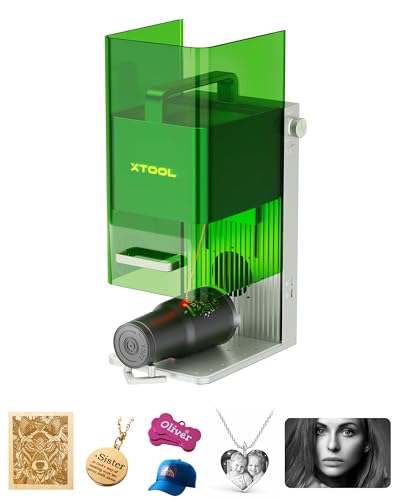
The xTool F1 is the most-misclassified product in this category, and getting the classification right is the most important thing you can do before considering it. The F1 is not a fiber galvo laser. It is a dual-laser engraver pairing a 2W infrared (IR) diode with a 10W visible-light diode in a single enclosed desktop unit. The IR laser marks metals; the visible-light diode cuts wood, leather, and acrylic.
This review will explain exactly when the F1 is the right purchase and when it isn't. The short version: if you genuinely need both metal marking and non-metal cutting work in a single safe, enclosed, family-friendly desktop machine, the F1 is the only product that delivers that combination at this price. The xTool F1 Ultra (a completely different machine at a higher price, with autofocus and a true MOPA-style IR head) is also frequently confused with the F1 base model — they share branding but not core specs.
For the right buyer — the maker, hobbyist, or small-business operator who wants to engrave a maker's mark on a wooden cutting board and a stainless steel oven thermometer in the same afternoon, with a machine that can sit on a kitchen counter without OD5+ eyewear — the F1 is unmatched. The 2W IR for metal is genuinely lighter-duty than a 20W fiber, the documented IR head failure pattern within 1–2 years is real risk, and the 4,000mm/s effective speed is slower than dedicated fiber. But all of that is the cost of the dual-laser concept, which simply doesn't exist anywhere else at this price.
Pros & Cons
Pros
- The F1 combines a 2W IR source and 10W diode in one enclosure; it is a dual-laser configuration, not a fiber galvo
- xTool Creative Space software is the most polished beginner interface in the laser category — camera positioning, guided material presets, and auto-layout workflows available from day one
- Fully enclosed with automatic safety shutoffs — the only machine in this tier safe to operate in an office, living room, or classroom without OD5+ eyewear and ventilation setup
- LightBurn compatible for users who want full parameter control beyond what xTool's software exposes
- xTool has the largest installed base and most active community of any Chinese laser brand — tutorial content, settings libraries, and troubleshooting threads for every use case are indexed and searchable
Cons
- 2W IR laser is NOT a fiber galvo — it produces lighter, less consistent marks on hard metal than a dedicated 20W fiber laser; an owner who ran both side by side measured the fiber as '25x faster on average for marking metal'
- IR laser head is the documented primary failure point — multiple owners report the IR head degrading or dying within 1–2 years of regular use; xTool support unable to repair in some markets
- No autofocus — autofocus is exclusive to the F1 Ultra; this model requires manual two-dot alignment each session (a common point of confusion because the F1 Ultra, a completely different machine, has autofocus)
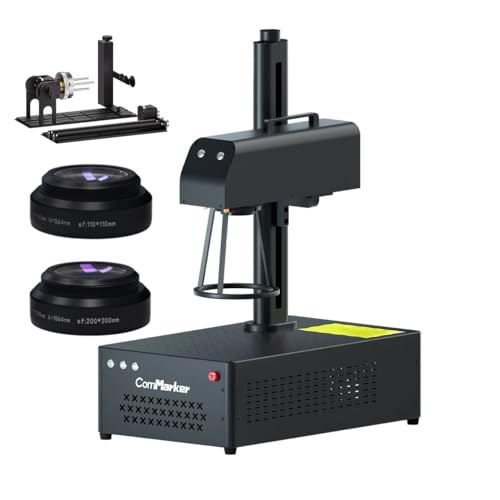
- 110×110mm work area matches budget dedicated fiber lasers — tumblers require a rotary and repositioning, no advantage here over GWEIKE or ComMarker alternatives
- Do not compare the F1's 2W IR workflow directly with a dedicated 30W fiber configuration; they are different product classes
Build Quality & Design
xTool's design language — the white-and-orange aesthetic, the substantial weight (2.5 kg in the F1 base, more in the F1 Ultra), the clean industrial profile — communicates 'product company' rather than 'OEM with a logo on it.' For a machine that will sit in a home office, classroom, or family workshop, the build quality is not a luxury; it's a usability feature.
The enclosure is the F1's most important hardware feature. The entire laser operation is sealed: an automatic safety shutoff stops both lasers when the lid is opened, the integrated ventilation routes fumes through a filter port (external fume extractor sold separately), and the orange-tinted window provides adequate visible-light protection during operation. The result is that the F1 is the only machine in this guide's tier that is safe to operate in an environment with bystanders — a meaningful difference for parents working in shared family spaces, teachers operating in classrooms, or small business owners running in retail environments.
The form factor is genuinely portable. At 2.5 kg, the F1 can move between desk and workshop without dedicated infrastructure. The integrated camera handles positioning automatically — point the camera at the work piece, click in the xTool Creative Space software, and the laser positions to the visible target without manual indexing. For first-time laser operators, this workflow is the single most accessible onramp in the category.
The critical clarification that has tripped up many buyers: the F1 base model does NOT have autofocus. Autofocus is exclusive to the F1 Ultra, which is a completely different machine with a true MOPA fiber galvo (not a 2W IR diode), different work area, and significantly higher price. If you've read marketing material mentioning autofocus, verify which xTool product you're looking at. The F1 base model uses a manual two-dot alignment system: the laser projects two visible dots on the work surface, and you adjust the work height until the dots converge into one point. This works but adds a step to each material change.
Laser Sources & Performance
The F1's defining design choice is its dual-laser architecture. Inside the enclosure are two distinct laser modules: a 2W infrared (1064nm) diode laser for metal marking, and a 10W visible-light (455nm) diode laser for cutting non-metals. The two lasers cannot fire simultaneously; you select which laser to use in software per job. This architecture is unique in the consumer laser market — every other machine in this price tier uses a single laser type.
The 2W IR laser is what enables metal marking. It produces visible monochrome marks on stainless steel, aluminum, brass, and titanium — the same metal families that a fiber galvo handles. The catch is the wattage and architecture: this is a 2W IR diode laser, not a 20W fiber galvo. The marks are lighter, less deep, and less consistent than what a dedicated 20W fiber produces on hard metal. An owner who ran the F1 alongside a dedicated 20W fiber laser measured the fiber as approximately 25x faster for equivalent metal marking work — the math compounds across batches. The F1 marks metal; it does not mark metal efficiently.
The 10W visible-light diode laser is the F1's strongest single component. At 10W, it cuts wood (up to roughly 6mm pine in multiple passes), engraves and cuts leather cleanly, cuts acrylic up to ~3mm, and engraves anodized aluminum (a different surface mechanism than the IR's metal marking). For makers doing wood cutting boards with engraved logos, leather goods with custom marks, or acrylic signage, the 10W diode performs comparably to dedicated diode-only machines like the xTool D1 Pro or Glowforge.
The 4,000mm/s galvo speed is significantly slower than dedicated fiber galvos (15,000mm/s on the GWEIKE G2). For metal marking specifically, this speed differential is meaningful — production-volume metal work on the F1 will take 3–4x longer than on a 20W fiber. For wood and acrylic cutting, speed is less of a competitive bottleneck because the 10W diode laser tops out on material thickness before it does on speed.
The documented hardware concern: the IR laser head is the F1's primary failure point. Multiple owner reports describe the 2W IR head degrading or failing within 1–2 years of regular use. xTool support has been unable to repair the IR head in some markets, leaving owners with a 10W-diode-only machine after the IR failure. For makers planning to depend on the metal-marking capability long-term, this is a real risk to plan around — budget for the possibility of replacing the machine in the 1–2 year timeframe if you use the IR heavily.
Software & Workflow
The xTool F1's software story is the strongest in the laser category and a meaningful piece of the value proposition. The native xTool Creative Space (XCS) software is the most polished, accessible, beginner-friendly laser control interface available — significantly better in usability terms than LightBurn for new users. The camera-positioning workflow, the guided material presets, the auto-layout features, and the integrated parameter library mean that a first-time operator can go from unboxing to first successful project in under an hour. No other machine in this tier comes close on day-one accessibility.
For users who want full parameter control beyond what XCS exposes, the F1 is also LightBurn compatible. LightBurn drives both the IR and visible-light lasers cleanly, gives you direct access to power/speed/frequency parameters per layer, and integrates with the standard LightBurn community settings ecosystem. The dual-software support means the F1 works for absolute beginners (use XCS) and advanced operators (use LightBurn) without forcing either group into the other's workflow.
The xTool community ecosystem is the largest in the Chinese laser space. xTool has the largest installed base of any single-brand consumer laser manufacturer, and the corresponding tutorial content, settings libraries, troubleshooting threads, and YouTube channel content cover essentially every use case. For any problem you might hit on the F1, the solution is already documented somewhere searchable. The combination of XCS accessibility and xTool community depth is the easiest entry point into laser engraving for users with zero prior experience.
The specific workflow advantage that matters most: the integrated camera. The F1's enclosed camera looks down at the work area and feeds a live image to XCS. You position the design directly on the visible work piece by clicking and dragging in the software — no manual measuring, no test marks, no laser focusing rituals required for positioning. This single feature accounts for most of the F1's accessibility advantage over dedicated fiber lasers, where positioning requires manual setup or red-dot alignment for every part.
Use-Case Performance
For mixed material work — the F1's intended use case — the value is unmatched at the price. A maker producing custom kitchen tools (wooden cutting boards with engraved logos, then stainless tongs with the same logo, then leather aprons with the logo) can run all three materials on a single machine without swapping.
For pure metal marking work, the F1 is the wrong purchase. For metal-only workflows, every dollar spent on the F1 over a dedicated fiber is wasted on the diode laser and enclosure you don't need.
If your work is purely wood, leather, or acrylic, the F1 has features you're paying for and never using.
For classroom and educational use, the F1 is unmatched. Several school maker spaces have standardized on the F1 specifically for these reasons.
For business use, the F1 makes sense for low-volume craft businesses (Etsy operators, custom-gift shops, small custom-product brands) where the mixed-material capability and ease of operation justify the throughput tradeoff. For higher-volume metal-marking businesses, the throughput gap versus dedicated fiber lasers will become limiting within months.
Value & Verdict
Against dedicated metal-marking fiber lasers at the same price (GWEIKE G2 Pro 30W), the F1 is a worse purchase for metal work. Against dedicated diode lasers at the same price (most 10W diode cutters), the F1 is overkill for non-metal work. The F1's price makes sense only against the dual-laser comparison: what does it cost to buy a dedicated fiber for metal work AND a dedicated diode for non-metal work AND a separate enclosure setup AND coordinate software/workflows across both machines?
The single most important question before purchase: do you actually need both metal and non-metal capability in a single safe enclosed machine? If yes — F1. If only metal — buy a fiber laser instead. If only non-metal — buy a dedicated diode laser instead.
The IR head longevity concern is real and should factor into the purchase decision. If your business depends on the metal-marking capability operating reliably for 3–5 years, the F1 is a risky bet — the documented 1–2 year IR failure pattern means you might be replacing the machine on a faster cycle than you'd plan around a dedicated fiber. For occasional makers and hobbyists, the risk is more acceptable; for production businesses, plan a depreciation budget that assumes IR replacement.
Buy the xTool F1 if: you need both metal and non-metal capability in a single machine, safe enclosed operation matters (family, classroom, retail environments), you value workflow accessibility and the integrated camera positioning, and you accept the per-laser performance tradeoffs versus dedicated alternatives. Skip it if: your work is metal-only (buy fiber instead), non-metal-only (buy dedicated diode instead), production volume on metal is critical to your business, or long-term IR longevity is mission-critical.
Our Verdict
The xTool F1 combines a 2W IR source with a 10W diode in an enclosed desktop machine. It is not a fiber galvo, and it should not be compared as though it were the same configuration as the F1 Ultra. ASIN B0CC56W8P6 was out of stock with no current Amazon price on July 10, 2026, so all Amazon buying exits are suppressed.
| Full Specifications | |
|---|---|
| Wattage | 2W |
| Laser Type | IR Diode (not fiber galvo) |
| Laser Source | xTool IR |
| Work Area (W) | 110mm |
| Work Area (H) | 110mm |
| Galvo Speed | 4000mm/s |
| Color Marking | No |
| LightBurn | Yes |
| Autofocus | No |
| Focal Length | 100mm |
| Weight | 2.5kg |
| Form Factor | desktop-enclosed |
| Software | xTool Creative Space + LightBurn |
| Pulse Width | N/A |
Frequently Asked Questions
Is the xTool F1 a fiber laser?
Does the F1 have autofocus?
What's the documented IR head longevity issue?
Compare With Similar Fiber Laser Engravers
OMTech
30W JPT MOPA
30 W · MOPA · Yes
No current Amazon offer
Head-to-Head Comparisons
xTool F1 Dual-Laser Engraver (2W IR + 10W Diode)
No current Amazon offer
Amazon offer checked 2026-07-10. Price and availability can change.