GWEIKE G2 Max 50W Fiber Laser Engraver vs Monport 20W Fiber Laser Engraver
Head-to-head spec comparison to help you pick the right fiber laser for your needs.
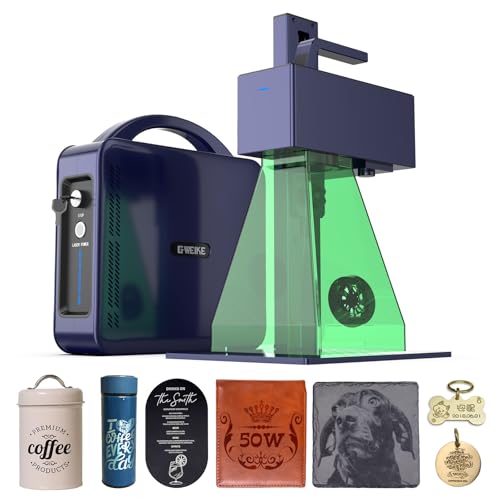
GWEIKE
$2,499
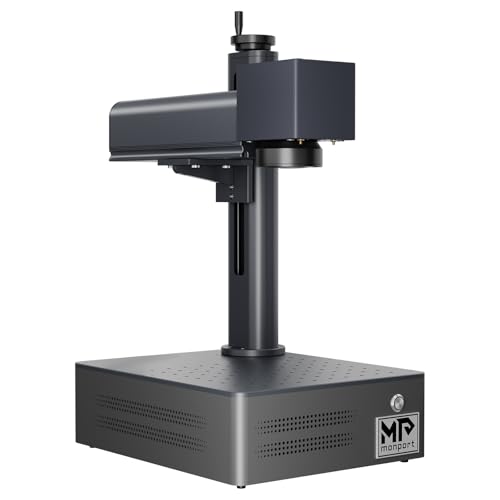
Monport
$1,299.99
Spec-by-Spec Comparison
| Spec | GWEIKE G2 Max 50W Fiber Laser Engraver | Monport 20W Fiber Laser Engraver |
|---|---|---|
| Wattage | 50 W | 20 W |
| Laser Type | Q-Switched | Q-Switched |
| Laser Source | Raycus | Raycus |
| Work Area (W) | 150 mm | 110 mm |
| Work Area (H) | 150 mm | 110 mm |
| Galvo Speed | 15000 mm/s | 7000 mm/s |
| Color Marking | Yes | No |
| LightBurn | Yes | Yes |
| Autofocus | No | No |
| Weight | 6.5 kg | 3.2 kg |
| Software | LightBurn + EZCad | BSLcad + LightBurn (galvo license required separately) |
| Pulse Width | N/A (Q-Switched, 20–200kHz frequency range) | N/A (Q-Switched) |
| Price | $2,499 | $1,299.99 |
| Rating | 7.8/10 | 6.5/10 |
| Buy on Amazon | Buy on Amazon |
Pros & Cons
GWEIKE G2 Max 50W Fiber Laser Engraver
Pros
- 50W Raycus fiber at 15,000mm/s is the highest wattage-speed combination in this price bracket — deep engraving to 5mm on metal is a documented standout capability no 30W machine at any price matches
- GWEIKE's LightBurn driver is the most actively maintained of any Chinese fiber laser brand — after the initial x/y axis calibration, LightBurn integration runs without the COR file gymnastics that ComMarker requires
- 150×150mm work area with 50W handles large plaques, long knife blades, and production batch runs on a single setup
- Active LightBurn settings ecosystem with a 37-material community settings pack (Etsy) specific to the G2 Max 50W covering metals, plastics, and stone
- 6.5kg portable form factor with detachable laser head — the same lightweight chassis as the G2 Pro 30W, not the heavy industrial frame you would expect at 50W output
Cons
- NOT a MOPA laser — earlier specs on this site incorrectly listed it as MOPA/JPT; it is a Raycus Q-switched fiber laser; no controllable pulse width, no MOPA-quality color marking libraries
- Calibration out of box requires x/y axis swap in LightBurn — documented by a verified owner (machinesformakers.com, Sep 2025); not a defect but a configuration step GWEIKE's documentation does not explain
- Compare this 50W Q-switched configuration with current 60W MOPA offers by exact source, field, controller, and workflow rather than expired prices
- Color marking is thermal oxidation, not MOPA — achievable on stainless and titanium with tuning but less consistent and less repeatable than a JPT MOPA; best-lasercutter.com explicitly notes this limitation
- No enclosure, no autofocus, and documentation rated poor by multiple owners — 50W Class 4 open-beam requires full PPE and a controlled workspace from day one
Monport 20W Fiber Laser Engraver
Pros
- The current Amazon title explicitly says LightBurn compatible and BSLcad included; confirm controller and license requirements with the seller
- Raycus 20W source marks stainless steel, aluminum, brass, titanium, copper, and anodized aluminum consistently — the same source family used in machines twice the price
- Q-switched monochrome marks are deep and durable — serial numbers, logos, and ID marks survive heavy daily use without fading or rubbing off
- 110×110mm work area covers rings, dog tags, knife blade sections, and metal business cards without repositioning
- 3.2kg form factor is genuinely portable — moves between bench and jobsite without fixed infrastructure or dedicated workspace
Cons
- LightBurn setup on the BSLFiber controller is poorly documented — LightBurn forum (Jan 2025) rated Monport's galvo setup instructions 'horrible'; expect troubleshooting before first successful job
- The catalog's 10,000mm/s speed claim trails GWEIKE's 15,000mm/s claim; neither title-only claim proves real-job throughput
- No color marking — Q-switched fixed pulse width cannot produce oxidation colors on stainless steel regardless of settings or software
- No autofocus — manual Z-axis height setup required for every material change or thickness variation; a friction point that dedicated color-marking workflows cannot absorb
- BSLcad community resources are nearly nonexistent — unlike GWEIKE or OMTech, no active forum threads, settings libraries, or YouTube tutorials specific to BSLcad workflows
Our Verdicts
GWEIKE G2 Max 50W Fiber Laser Engraver
The GWEIKE G2 Max 50W is a Q-switched, 50W configuration for buyers prioritizing engraving speed over MOPA pulse control. The verified Amazon offer was $2,499 on July 10, 2026. Compare it against current 60W MOPA offers by exact source, controller, work area, and support rather than the expired $1,199 comparison.
Monport 20W Fiber Laser Engraver
The Monport 20W remains a basic metal-marking option for buyers prepared to self-support a thinly documented BSLcad and LightBurn setup. The verified Amazon offer was $1,299.99 with limited stock on July 10, 2026, not the historical $349 configuration described in older copy. At essentially the same verified price as the GWEIKE G2 20W, choose on software support, work area, and seller terms rather than an outdated budget claim.