ComMarker B6 20W Fiber Laser Engraver vs xTool F1 Ultra 20W Fiber & Diode Dual Laser Engraver
Head-to-head spec comparison to help you pick the right fiber laser for your needs.
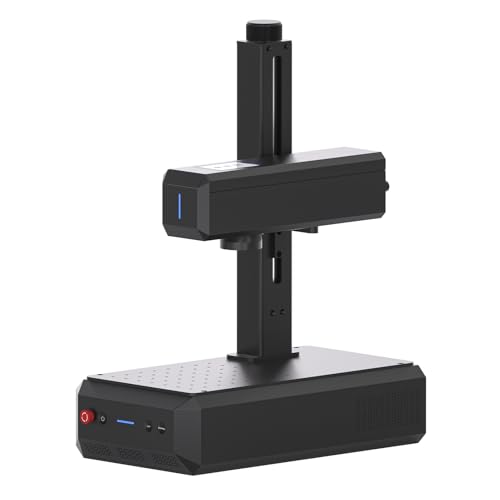
ComMarker
$1,599
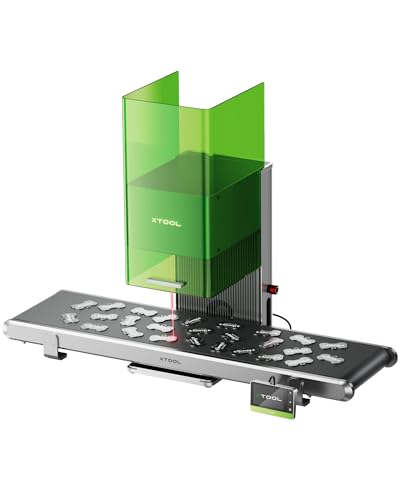
xTool
Unavailable
Spec-by-Spec Comparison
| Spec | ComMarker B6 20W Fiber Laser Engraver | xTool F1 Ultra 20W Fiber & Diode Dual Laser Engraver |
|---|---|---|
| Wattage | 20 W | 20 W |
| Laser Type | Q-Switched | Q-Switched |
| Laser Source | Raycus | Not disclosed |
| Work Area (W) | 150 mm | 220 mm |
| Work Area (H) | 150 mm | 220 mm |
| Galvo Speed | 8000 mm/s | 10000 mm/s |
| Color Marking | No | No |
| LightBurn | Yes | Yes |
| Autofocus | Yes | Yes |
| Weight | 3.5 kg | 14.7 kg |
| Software | LightBurn + EZCad | xTool Creative Space; basic LightBurn workflow supported |
| Pulse Width | N/A (Q-Switched) | N/A (Q-Switched) |
| Price | $1,599 | Unavailable |
| Rating | 8.0/10 | 8.6/10 |
| Buy on Amazon | Amazon offer unavailable (checked 2026-07-10) |
Pros & Cons
ComMarker B6 20W Fiber Laser Engraver
Pros
- 150×150mm work area — 35% larger than the GWEIKE G2's 110mm field — fits tumblers on a rotary chuck and full knife blades without repositioning
- The current title identifies an autofocus screen, a meaningful workflow distinction from manual-focus 20W alternatives
- LightBurn confirmed working with EZCad also included — both workflows supported; buyers coming from diode lasers have immediate LightBurn continuity
- Built-in touchscreen display for settings and job status — removes the need to monitor a laptop during production runs
- 20W Raycus Q-switched marks steel, aluminum, brass, titanium, and copper consistently — ComMarker's production volume means quality control is verified across thousands of units
Cons
- Cataloged as Q-switched rather than MOPA; compare a currently available MOPA configuration when pulse-width control is required
- No enclosure — Class 4 open-beam fiber laser; the invisible 1064nm infrared beam requires OD5+ eyewear and either a dedicated enclosure or a controlled workspace with no reflective surfaces
- Thinner community than GWEIKE — fewer Reddit threads and YouTube settings tutorials; troubleshooting depends more on ComMarker support channels than community knowledge
- The current title does not confirm an included rotary; verify the exact bundle before planning cylindrical work
xTool F1 Ultra 20W Fiber & Diode Dual Laser Engraver
Pros
- 20W fiber and 20W diode sources cover metal engraving alongside common wood, acrylic, leather, and other diode-compatible work
- A 220×220mm base work area and camera-led XCS workflow support positioning and repeatable batch layouts
- The enclosure can create xTool's documented Class-1 operating conditions when it is fully closed, the exhaust pipe remains installed, and the enclosure-stop control is enabled
- Autofocus, smart fill, and camera-assisted positioning reduce manual setup for compatible XCS workflows
- The optional conveyor and rotary accessories extend the machine beyond flat, single-piece jobs
Cons
- xTool does not identify the F1 Ultra as a MOPA model, so it is not the family choice for controlled pulse-width color work
- LightBurn supports a basic processing workflow but not the machine's complete feature set; xTool directs full-feature use to XCS
- Camera-led automation and signature batch features remain dependent on xTool Creative Space
- At 14.7 kg, it is a desktop machine rather than a lightweight event engraver
- The fiber-source manufacturer is not disclosed in xTool's current official documentation
Our Verdicts
ComMarker B6 20W Fiber Laser Engraver
The ComMarker B6 is the 20W option to compare when a 150mm field and autofocus matter more than MOPA pulse control. The verified Amazon offer was $1,599 on July 10, 2026. That price removes it from any under-$600 decision path. If color work is required, compare an available MOPA configuration instead of following the currently unavailable OMTech 30W exit.
xTool F1 Ultra 20W Fiber & Diode Dual Laser Engraver
The xTool F1 Ultra is a strong fit for buyers who need 20W fiber and 20W diode capability in one camera-guided desktop workflow. Its enclosure has conditional Class-1 operating conditions, not a blanket exemption from laser-safety controls, and its full automation remains XCS-dependent. It is not the MOPA choice for controlled pulse-width color work. The tracked Amazon offer remains out of stock, so Amazon buying exits and Offer structured data stay suppressed until a fresh eligible offer is verified.
xTool F1 Ultra 20W Fiber & Diode Dual Laser Engraver
No current Amazon offer