xTool
F1 Ultra
No current Amazon offer
At a Glance
Best For
Overview
The xTool F1 Ultra combines a 20W fiber laser and a 20W diode laser in a 14.7 kg desktop system. That combination is the reason to consider it: the fiber source covers metal-focused work while the diode source broadens the material range, and xTool Creative Space connects both to camera-assisted positioning and batch features. The fiber-source manufacturer is not disclosed in xTool's current official documentation. This is a documentation-based review, not a claim of hands-on testing, and the F1 Ultra should not be confused with the newer 60W MOPA F2 Ultra.
Pros & Cons
Pros
- 20W fiber and 20W diode sources cover metal engraving alongside common wood, acrylic, leather, and other diode-compatible work
- A 220×220mm base work area and camera-led XCS workflow support positioning and repeatable batch layouts
- The enclosure can create xTool's documented Class-1 operating conditions when it is fully closed, the exhaust pipe remains installed, and the enclosure-stop control is enabled
- Autofocus, smart fill, and camera-assisted positioning reduce manual setup for compatible XCS workflows
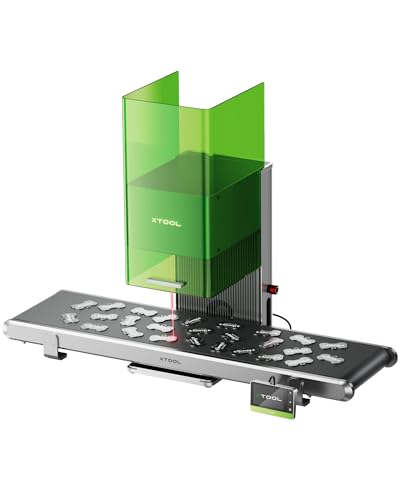
- The optional conveyor and rotary accessories extend the machine beyond flat, single-piece jobs
Cons
- xTool does not identify the F1 Ultra as a MOPA model, so it is not the family choice for controlled pulse-width color work
- LightBurn supports a basic processing workflow but not the machine's complete feature set; xTool directs full-feature use to XCS
- Camera-led automation and signature batch features remain dependent on xTool Creative Space
- At 14.7 kg, it is a desktop machine rather than a lightweight event engraver
- The fiber-source manufacturer is not disclosed in xTool's current official documentation
What the F1 Ultra Actually Is
The F1 Ultra is a dual-source engraver with a 20W fiber laser for metal-focused processing and a 20W blue diode laser for materials such as wood, acrylic, leather, and paper. xTool lists a 220×220mm base work area, up to 10,000mm/s processing speed, and an official machine weight of 14.7 kg. The fiber-source manufacturer is not disclosed, so this review does not attribute the module to any supplier.
The important buying distinction is versatility rather than a claim that one source replaces every specialist laser. The fiber and diode modules cover different material families, while the camera and autofocus features organize the workflow around xTool Creative Space. Published capability statements here are bounded to xTool's documentation; they are not independent durability, throughput, or finish tests.
Enclosure and Laser Safety Conditions
xTool classifies the F1 Ultra as a Class 4 laser product. Its enclosure can create the manufacturer's documented Class-1 operating conditions only when the material fits inside a fully closed enclosure, the exhaust pipe remains installed and stable, and the "Stops when enclosure opened" function is enabled in XCS. Accessories or oversized work that prevent full closure return the setup to Class 4 conditions.
Those conditional Class-1 conditions are not an unconditional substitute for personal protective equipment, ventilation, fire controls, training, or a controlled workspace. For Class 4 operation, xTool's current eyewear table specifies OD6+ protection for the F1 Ultra's listed working wavelengths. Operators should follow the user manual and site-specific laser-safety requirements instead of treating the enclosure as a blanket safety claim.
xTool Creative Space and LightBurn
xTool documents a basic LightBurn workflow for connecting the F1 Ultra and starting laser processing. The same guidance says LightBurn does not support the machine's full feature set, including examples such as real-time framing and material embossing, and directs users to xTool Creative Space (XCS) for complete functionality.
That makes the software decision straightforward. LightBurn can serve a basic design-to-processing workflow, but camera-led automation, smart positioning, and the signature production features remain XCS-dependent where xTool documents them. This review does not generalize an old forum report into a current product-wide defect; buyers should instead evaluate the officially documented feature boundary between the two applications.
F1, F1 Ultra, F2, and F2 Ultra Naming
The names describe materially different machines. The original F1 uses a 2W IR source plus a 10W diode. The F1 Ultra reviewed here uses a 20W fiber source plus a 20W diode. The F2 is a different portable dual-source model with a 5W IR source and a 15W diode, not a revision of the F1 Ultra.
The F2 Ultra is the 60W MOPA family member, paired with a 40W diode in the dual-laser configuration. xTool identifies the F2 Ultra's infrared source as MOPA; it does not apply that designation to the F1 Ultra. Therefore, the F1 Ultra is not the MOPA choice for controlled pulse-width color work. Shoppers searching for that workflow should compare the actual MOPA configuration rather than infer capability from the word "Ultra."
Materials, Work Area, and Batch Workflow
The 20W fiber source is intended for metal engraving, deep engraving, relief work, and the thin-metal processing limits xTool publishes. The 20W diode broadens the system to common organic and coated materials. Actual depth, color, edge quality, and pass count depend on the material, settings, focus, and environment; the examples on the manufacturer page are not a promise of identical output on every workpiece.
The base 220×220mm work area is larger than the original F1's field and can be extended with the optional conveyor for repeated layouts. XCS uses the camera for positioning, shape recognition, and batch-oriented features, while rotary work requires the appropriate accessory and setup. This configuration suits shops that regularly move between metal and diode-compatible stock; a single-purpose machine may be a simpler fit when one specialized process dominates every job.
Who Should Buy It
Choose the F1 Ultra when you genuinely need 20W fiber and 20W diode processing in one enclosed desktop workflow, value camera-assisted XCS features, and can follow the enclosure and Class 4 operating requirements for each setup. A mixed-material shop can switch between the two sources without maintaining separate machines.
Skip it when controlled pulse-width MOPA work is the priority, when LightBurn must expose every signature automation feature, or when a lighter event-oriented machine matters more than the 220×220mm field. The tracked Amazon offer remains OUT_OF_STOCK, so the canonical page suppresses Amazon buying exits and Offer structured data. That offer gate is separate from the direct manufacturer reference and should be rechecked rather than treated as durable availability.
Official sources
- xTool F1 Ultra 20W Fiber & Diode Dual Laser Engraver
xTool · official · accessed 2026-07-17
- xTool F1 vs xTool F1 Ultra: Difference Explained
xTool · official · accessed 2026-07-17
- Operate xTool F1 Ultra with LightBurn
xTool · official · accessed 2026-07-17
- LSO Training for xTool F1 Ultra
xTool · official · accessed 2026-07-17
- Safety Goggles Selection
xTool · official · accessed 2026-07-17
- xTool F2 5W IR & 15W Diode Portable Dual Laser Engraver
xTool · official · accessed 2026-07-17
- xTool F2 Ultra User Guide
xTool · official · accessed 2026-07-17
Our Verdict
The xTool F1 Ultra is a strong fit for buyers who need 20W fiber and 20W diode capability in one camera-guided desktop workflow. Its enclosure has conditional Class-1 operating conditions, not a blanket exemption from laser-safety controls, and its full automation remains XCS-dependent. It is not the MOPA choice for controlled pulse-width color work. The tracked Amazon offer remains out of stock, so Amazon buying exits and Offer structured data stay suppressed until a fresh eligible offer is verified.
| Full Specifications | |
|---|---|
| Wattage | 20W |
| Laser Type | Q-Switched |
| Laser Source | Not disclosed |
| Work Area (W) | 220mm |
| Work Area (H) | 220mm |
| Galvo Speed | 10000mm/s |
| Color Marking | No |
| LightBurn | Yes |
| Autofocus | Yes |
| Focal Length | 163mm |
| Weight | 14.7kg |
| Form Factor | desktop-enclosed |
| Software | xTool Creative Space; basic LightBurn workflow supported |
| Pulse Width | N/A (Q-Switched) |
Frequently Asked Questions
Is the xTool F1 Ultra a MOPA laser?
Does the xTool F1 Ultra work with LightBurn?
Is the xTool F1 Ultra a Class 1 laser?
How is the F1 Ultra different from the F2 Ultra?
Related Buying Guides
Head-to-Head Comparisons
xTool F1 Ultra 20W Fiber & Diode Dual Laser Engraver
No current Amazon offer
Amazon offer checked 2026-07-10. Price and availability can change.